
🔥 FLEXIBLE & SECURE PAYMENTS — USDT • USDC • BTC • ETH • SOL • TRON (TRC20) • BINANCE PAY • KAST & MORE
How to Choose an IPTV Provider: A Practical Buyer’s Guide
How to choose an IPTV provider: define your must-haves, check content rights and devices, run a structured trial, compare effective monthly costs and spot red flags.
 plustv
•
13 min read
If you have ever paid for a streaming service only to find your favourite channel freezing on a Friday night, you already know why choosing carefully matters. Knowing how to choose an IPTV provider is less about chasing the biggest channel count and more about the everyday details: whether the channels you actually watch load quickly, whether everyone at home can find their way around the app, and whether someone answers when something goes wrong.
This guide walks through the decision in the order that saves the most money and frustration: deciding what you need, checking what a provider is allowed to offer, testing on your own equipment, comparing real costs and spotting the warning signs. It does not rank providers or promise that any service will be perfect, because no internet-delivered TV service can guarantee that.
Table of Contents
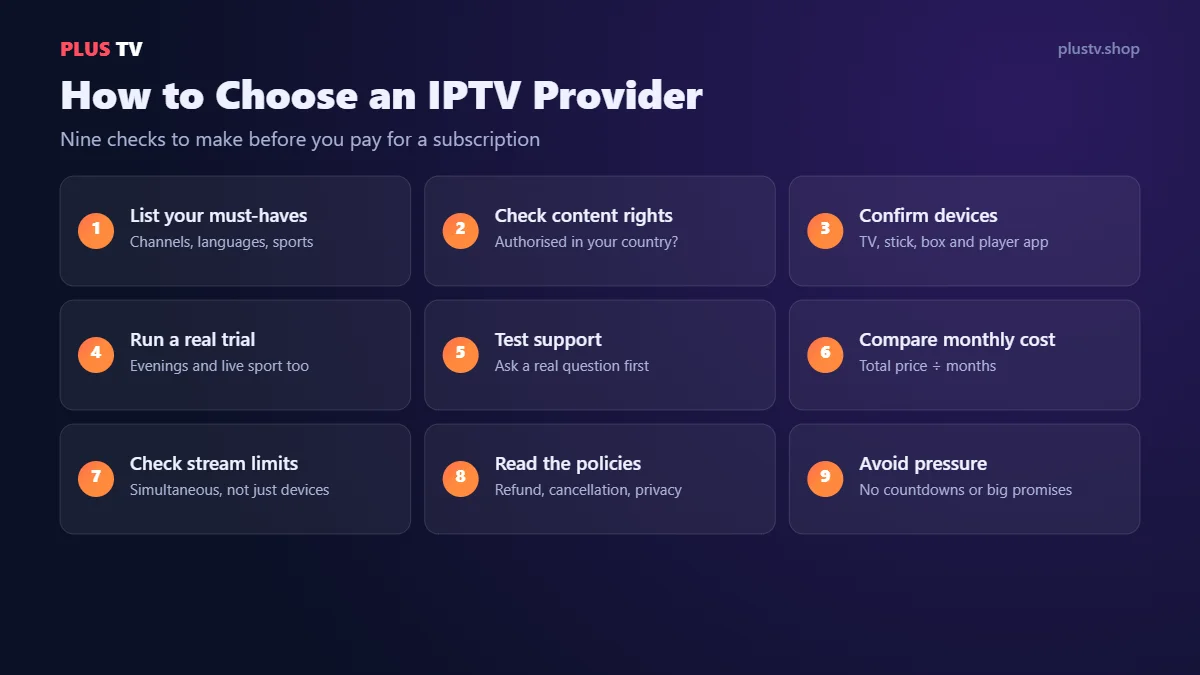
How to choose an IPTV provider: the short version
If you are short on time, these nine checks cover the decisions that matter most. Each one is explained in more detail below.
- List the channels, languages and sports you genuinely watch every week.
- Confirm the provider is authorised to offer that content where you live.
- Check that your TV, stick or box and the recommended player app are supported.
- Run a structured trial on your own device, in the evening as well as during the day.
- Test support with a real question before you pay.
- Compare plans by effective monthly cost, not the headline price.
- Confirm how many streams can play at the same time.
- Read the refund, cancellation and privacy policies.
- Walk away from anything that relies on pressure or impossible promises.
Decide what “best” means for your household
The best IPTV provider for one home can be a poor fit for another. A household that mainly watches news in two languages has different priorities from a sports fan who needs stable live events, or a family that wants simple navigation and parental controls. Before you look at a single offer, write a short list of must-haves.
A useful list includes the ten or so channels you watch most, the languages you need, any sports competitions you follow, the devices in your home, how many people watch at the same time, and your budget. Keep it on paper or in a note on your phone. When a sales page boasts about thousands of channels, your list keeps you focused on the handful that decide whether the service is worth paying for.
If IPTV itself is new to you, our explainer on what IPTV is covers how it differs from cable and satellite before you start comparing services.
Check content rights and availability
IPTV is a delivery technology, not a type of content. Whether a service is legitimate depends on whether it has the rights to distribute the channels and programmes it offers in your territory. An impressive channel list is not proof of licensing, and availability can change as broadcast rights move between companies.
Ask providers which content they are authorised to supply in your country and read their terms of service. A trustworthy business can explain this plainly. If a seller avoids the question or treats it as a technicality, that is a reason to investigate further rather than a detail to ignore. Review the published channel list for any service you are considering, and check that your must-have channels appear for your region rather than just in general.
Confirm your devices and apps are supported
A demo on a salesperson’s phone tells you very little about how a service will run on your television. Check that the provider supports the exact devices you plan to use, whether that is a smart TV, an Android box, an Amazon Fire TV device, a phone or a tablet. Then check which player app it recommends and whether that app is available from your device’s official app store.
Ask whether the player app has its own activation fee. Many IPTV services and player apps are sold separately, so the subscription price may not be the full cost. Look at the provider’s installation tutorial before buying: clear, current setup instructions are a good sign, while vague advice to “just sideload it” is not. If you use a Fire TV device, our guide to IPTV on Fire TV Stick explains what to check on that platform.
Run a structured trial
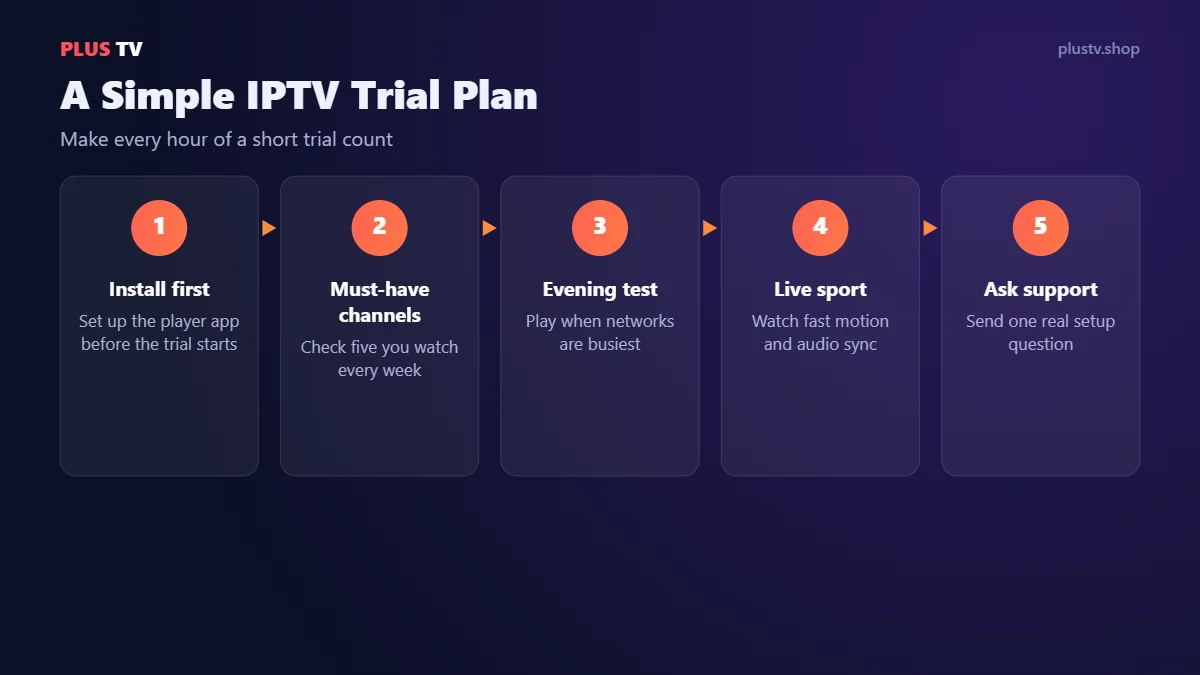
A good trial is a checklist, not ten minutes of channel surfing. If a provider offers a trial, plan how you will use it before it starts so the clock does not run out while you are still installing apps.
During the trial, test five of your must-have channels, at least one live sports event if one is available, the programme guide, subtitles, catch-up or video-on-demand navigation, and basic playback controls. Do this at least once in the evening, when networks are busiest, as well as during a quiet part of the day. If you can, compare Wi-Fi with a wired Ethernet connection to see whether problems come from your home network or the service.
Write down the time, device and channel whenever something fails. That record helps you judge the service fairly and gives support something concrete to work with. Remember that a 24-hour or 48-hour test reveals everyday issues but cannot prove long-term reliability. If buffering shows up, rule out your own setup first; the FCC’s broadband speed guide is a neutral reference for how much bandwidth video needs.
Finally, involve the people who will actually use the service. Ask a family member to find a channel and start a programme without your help. If they struggle during the trial, they will struggle every evening after you have paid.
Judge picture quality beyond the 4K label
A 4K badge describes a stream, not the experience you will get. Look for sharpness, a steady frame rate, audio that stays in sync and quick switching between channels. Fast sport is the most revealing test, because rapid movement exposes compression artefacts and dropped frames that a slow-moving news programme hides.
Keep your own equipment in mind too. A 4K stream will not look like 4K on an HD television, and a busy Wi-Fi connection can force lower quality or cause pauses. A stable full-HD picture is usually more enjoyable than a 4K stream that keeps stopping.
Test support before you pay
Support quality only becomes obvious when something goes wrong, so test it while you are still deciding. Send a straightforward question, such as how to set up the service on your specific device or how many streams your plan allows, and see what comes back.
Helpful support asks for useful details like your device model, app and error message, gives concrete next steps and is honest about limits. Round-the-clock availability is only valuable if the answers are accurate. Note how long the reply took and keep a copy of anything promised in writing, including plan details and refund terms.
Compare plans by effective monthly cost
Headline prices are designed to look attractive, and longer plans almost always look cheaper per month. To compare offers fairly, divide the total price by the number of months included, then add any extra costs such as player app fees or payment fees.
| Plan | Total price | Months | Effective monthly cost |
|---|---|---|---|
| Monthly, renewed for a year | 12 × $12.99 = $155.88 | 12 | $12.99 |
| 3-month plan | $29.99 | 3 | about $10.00 |
| Annual plan | $39.99 | 12 | about $3.33 |
In this example, the annual plan works out far cheaper per month than paying monthly for a year. That only matters if the service meets your needs, because a longer plan also commits more money upfront. A sensible approach is to start with the shortest plan that is reasonably priced, confirm the service works for your household, and move to a longer plan once you are confident. Before committing, read the refund and returns policy so you know exactly what happens if it does not work out.
Check simultaneous streams carefully
“Works on two devices” does not always mean two screens can play at the same time. Ask whether both connections can stream simultaneously, whether they must be in the same household, and what happens if you exceed the limit. Also check whether you can switch freely between devices, for example between a living-room TV and a tablet.
If several people in your home watch live sport or news at the same time, the number of simultaneous streams can matter more than the size of the channel list. It is much easier to choose the right plan at the start than to discover the limit during a big match.
Review payment, privacy and refund terms
Look for a real privacy policy, a recognisable checkout and clear billing terms that say when you will be charged and how to cancel. Never send a card number, password or one-time verification code in a chat window. Where possible, use a payment method with protections you understand.
If you choose to pay with cryptocurrency, understand that blockchain transfers are generally difficult or impossible to reverse once confirmed. Our guide to buying IPTV with crypto explains the checks to make first. The US Federal Trade Commission’s advice on free trials and auto-renewals is also worth reading, because some trials turn into paid subscriptions automatically.
Evaluate the app experience
A provider’s content is only as good as your ability to find it. Can family members locate channels without memorising numbers? Are categories consistent and clearly named? Is the electronic programme guide readable from the sofa? Does search separate a film from programmes with similar titles?
A smooth, well-organised app can make a modest catalogue more enjoyable than a huge one that is hard to navigate. If parental controls matter to you, check how they work in the recommended player app during the trial rather than assuming they exist.
Questions to ask a provider before you buy
Sending a few direct questions is one of the quickest ways to separate a transparent business from a vague one. The answers matter, but so does how they are given: clear, consistent replies in writing are a good sign. Useful questions include:
- Which of my must-have channels are available in my country, and are you authorised to provide them here?
- Which devices and player apps do you support, and does the app charge its own fee?
- How many streams can play at the same time on this plan?
- What happens if a channel I rely on is removed during my subscription?
- How long does activation usually take after payment, and how will I receive my details?
- Where can I read your refund, cancellation and privacy policies?
- How do I contact support, and what are your typical response times?
Keep the replies with your order confirmation. If something later goes wrong, a written answer is far more useful than a remembered conversation.
Red flags to watch for
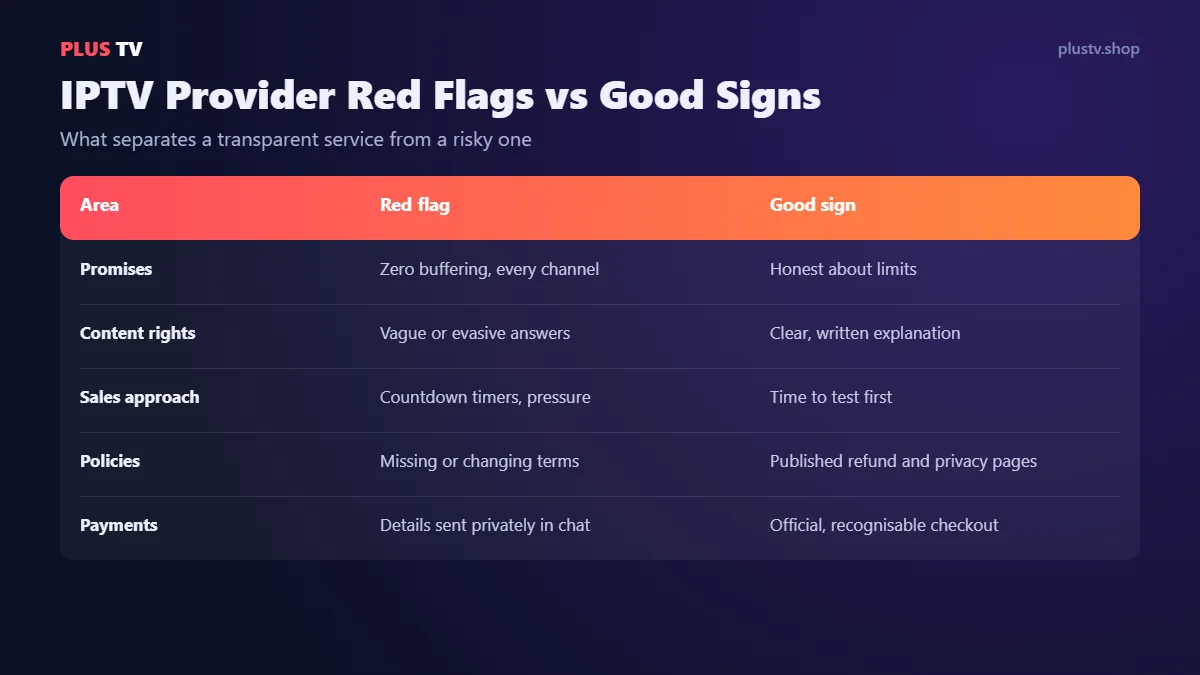
Some warning signs are worth taking seriously no matter how attractive the price looks:
- Impossible promises. Claims of zero buffering, every channel in the world or every live event guaranteed.
- Pressure tactics. Countdown timers, “last chance” prices and sellers who push you to pay before you have tested.
- No written terms. Missing refund, privacy or cancellation policies, or terms that change from one chat to the next.
- Evasive answers about rights. Vague replies when you ask what the provider is authorised to offer.
- Requests for sensitive details. Anyone asking for passwords, verification codes or wallet recovery phrases.
- Payment details sent privately. A new bank account or wallet address sent from an unfamiliar account rather than shown at the official checkout.
Be equally cautious about advice that a VPN will fix every problem. A VPN changes how traffic is routed, which can help or hurt performance, and it does not change what you are entitled to watch.
A simple scoring framework
Once you have tested two or three options, score each one from one to five in six areas: authorised content for your must-have channels, device compatibility, real-world playback, support quality, pricing clarity and privacy. Weight the areas to suit your household. A sports fan might double the playback score, while a family might weight app navigation and parental controls more heavily.
Add up the weighted scores and choose the option with the best evidence behind it, not the loudest advertisement. If two services are close, the one with clearer terms and more helpful support is usually the safer long-term choice.
Frequently asked questions
How do I choose an IPTV provider?
Start with a list of the channels and devices you actually use, confirm the provider is authorised to offer that content where you live, run a structured trial on your own TV, test support, and compare plans by effective monthly cost before paying.
Is IPTV legal?
IPTV is a delivery technology. Whether a particular service is legal depends on whether it has the rights to distribute its content in your territory. Check the provider’s terms and ask what it is authorised to offer.
Do I need a special box for IPTV?
Not always. Many services work through player apps on common smart TVs, streaming sticks, phones and tablets. Check the provider’s supported device list and installation guide first.
Is a 4K IPTV plan always better?
Only if the source stream, your internet connection and your TV all support 4K well. A stable full-HD stream is usually a better experience than an unstable 4K one.
Should I pay for a year upfront?
A longer plan usually costs less per month, but it commits more money at once. Test the service on your own devices and read the refund policy before choosing an annual plan.
How many devices can I use with one IPTV subscription?
It depends on the plan. Ask specifically how many streams can play at the same time, not just how many devices can be logged in.
Final checklist before checkout
Before you pay, confirm your must-have channels and region, the provider’s rights to offer them, your device and player app, the simultaneous-stream limit, your trial results, the support contact, the payment method and the refund terms. Keep a record of the plan you chose and when it renews. That is how to choose an IPTV provider with confidence rather than hope. If you are considering Plus TV, our overview of the Plus TV service explains the available plans and setup process; always confirm current availability and terms before purchasing.
Related Articles
November 20, 2026
IPTV in Kosovo, Serbia and North Macedonia: Language and Device Compatibility Guide

November 20, 2026
IPTV in the Balkans: A Regional Viewing Guide for Families and Diaspora

November 20, 2026
IPTV in Albania: Devices, Albanian Language and Setup Guide

November 20, 2026