
🔥 FLEXIBLE & SECURE PAYMENTS — USDT • USDC • BTC • ETH • SOL • TRON (TRC20) • BINANCE PAY • KAST & MORE
IPTV in Kosovo, Serbia and North Macedonia: Language and Device Compatibility Guide
IPTV in Kosovo, Serbia and North Macedonia: test Albanian, Latin and Cyrillic support, devices, guides and networks, and confirm rights in each country.
 plustv
•
11 min read
Setting up IPTV in Kosovo, Serbia and North Macedonia is a surprisingly good stress test for any streaming app. One household may need Albanian, another Serbian in Latin script, a third Serbian or Macedonian in Cyrillic, and all of them may be using TVs from different generations. An app that shows a channel name correctly can still mangle a search, a subtitle or a programme description.
So rather than treating the three countries as one market, this guide treats them as three separate setups that happen to share a border and, often, a family. You will find a quick script test, a device matrix, ways to tell network faults from language faults, and the licensing questions to settle before paying.
Table of Contents
Its aim is to help a household record what worked on which device and in which permitted territory, not to present three markets as a single licensing zone. The practical question with IPTV for Kosovo, Serbia and North Macedonia is whether a household can use the same player across languages, devices and distinct territorial rights.
IPTV in Kosovo, Serbia and North Macedonia: compatibility checks
At a glance: Compare the authorized viewing territory, exact device model and interface language for each household. Check Albanian, Serbian Latin/Cyrillic and Macedonian text where relevant, rather than assuming that one regional package works identically in all three countries.
Kosovo, Serbia and North Macedonia are often grouped together in regional IPTV marketing, but their app availability, languages and content rights should be checked separately. An application that installs correctly in one country may be absent from a different national store, while a program guide may mishandle Cyrillic or accented Latin text. This guide offers a device-first comparison method that readers can repeat without relying on invented channel lists or unsupported claims about service coverage.
Compare three markets individually
Kosovo, Serbia and North Macedonia should not be treated as one licensing territory. A package marketed as ‘Balkan TV’ might emphasize different channels in each country, and rights to live sports or films can vary. Write a separate shortlist for each household location. Ask for the exact channels and their authorized availability, then test the relevant ones. Where relatives live across borders, do not assume the same subscription can be used simultaneously in every country. Clarify travel and concurrent-stream rules before paying.
Character sets and language tracks
Albanian, Serbian and Macedonian preferences create practical interface requirements. Test Latin and Cyrillic script rendering in search results and the electronic program guide, as appropriate for the programs your household watches. Check whether subtitle and audio tracks can be selected independently of the app’s menu language. Some guides contain transliterated or incomplete titles; this can make programs difficult to find even when a channel is present. Verify guide times, accents and script display on the television itself, not only in a promotional screenshot.
Device support across borders
An app may appear in one national app store but not another. Confirm availability for the device’s configured country, model year and operating-system version. If using a certified external streaming box, update it before testing and use an official store wherever possible. Avoid unknown installers that request excessive permissions. For cross-border households, maintain separate notes on account country, billing terms and language settings. That documentation is especially helpful when a family member says the same service behaves differently on two otherwise similar televisions.
Treat three markets as three independent setups
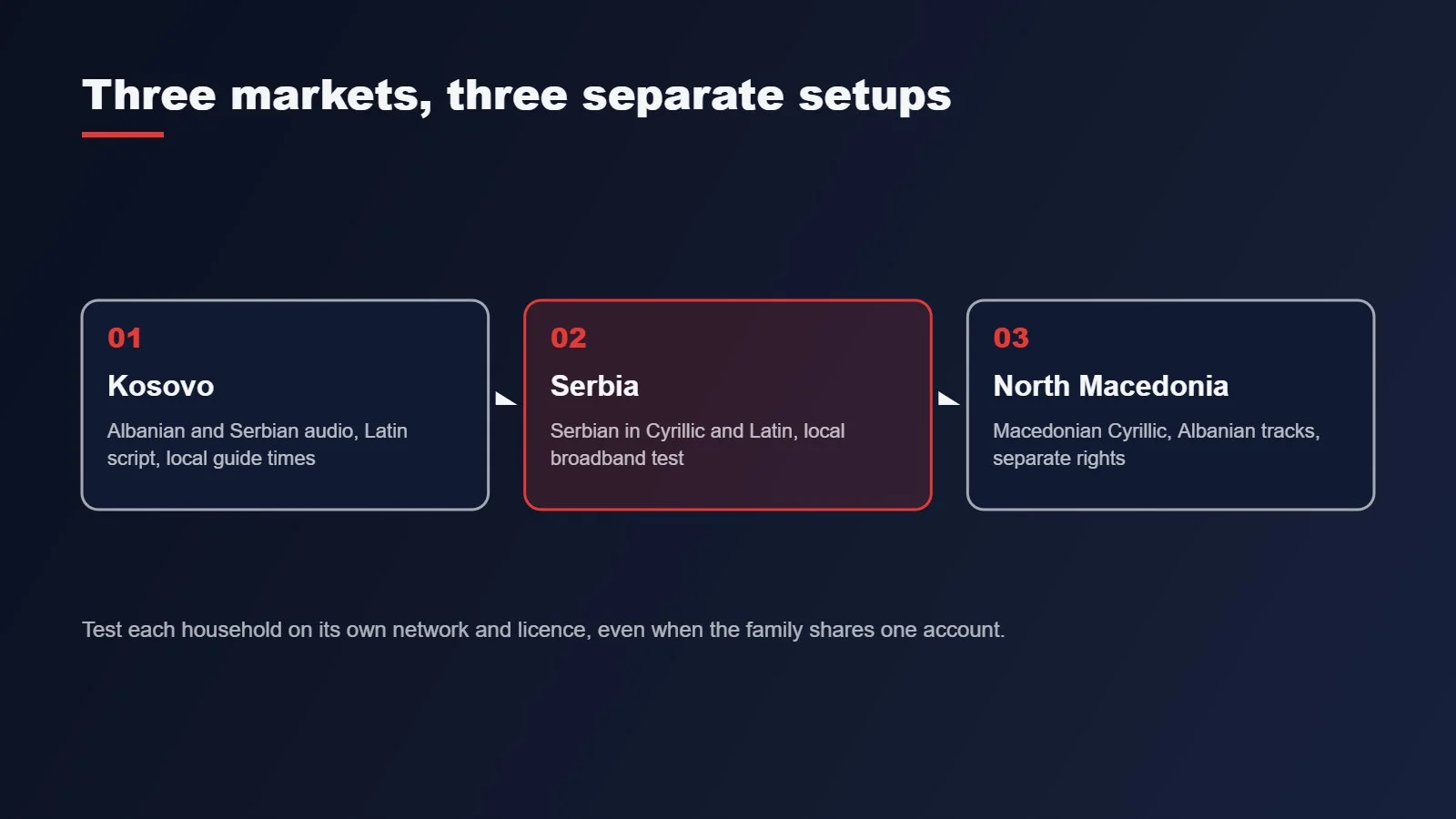
Kosovo, Serbia and North Macedonia should not be merged into one generic playlist story. A family may need Albanian language support in Kosovo, Serbian Latin or Cyrillic in Serbia, and Macedonian Cyrillic in North Macedonia. These are usage examples, not a claim that everyone in a country watches the same content. For each actual household, write down the app store region, television operating system, preferred scripts, internet connection and legal distribution territory.
Then test the subscription against that sheet. One successful Android TV installation in Prishtina does not imply the same app is available on a Samsung television in Belgrade or a set-top box in Skopje. The compatibility question must be answered device by device and territory by territory.
Cyrillic and Latin are a practical software test
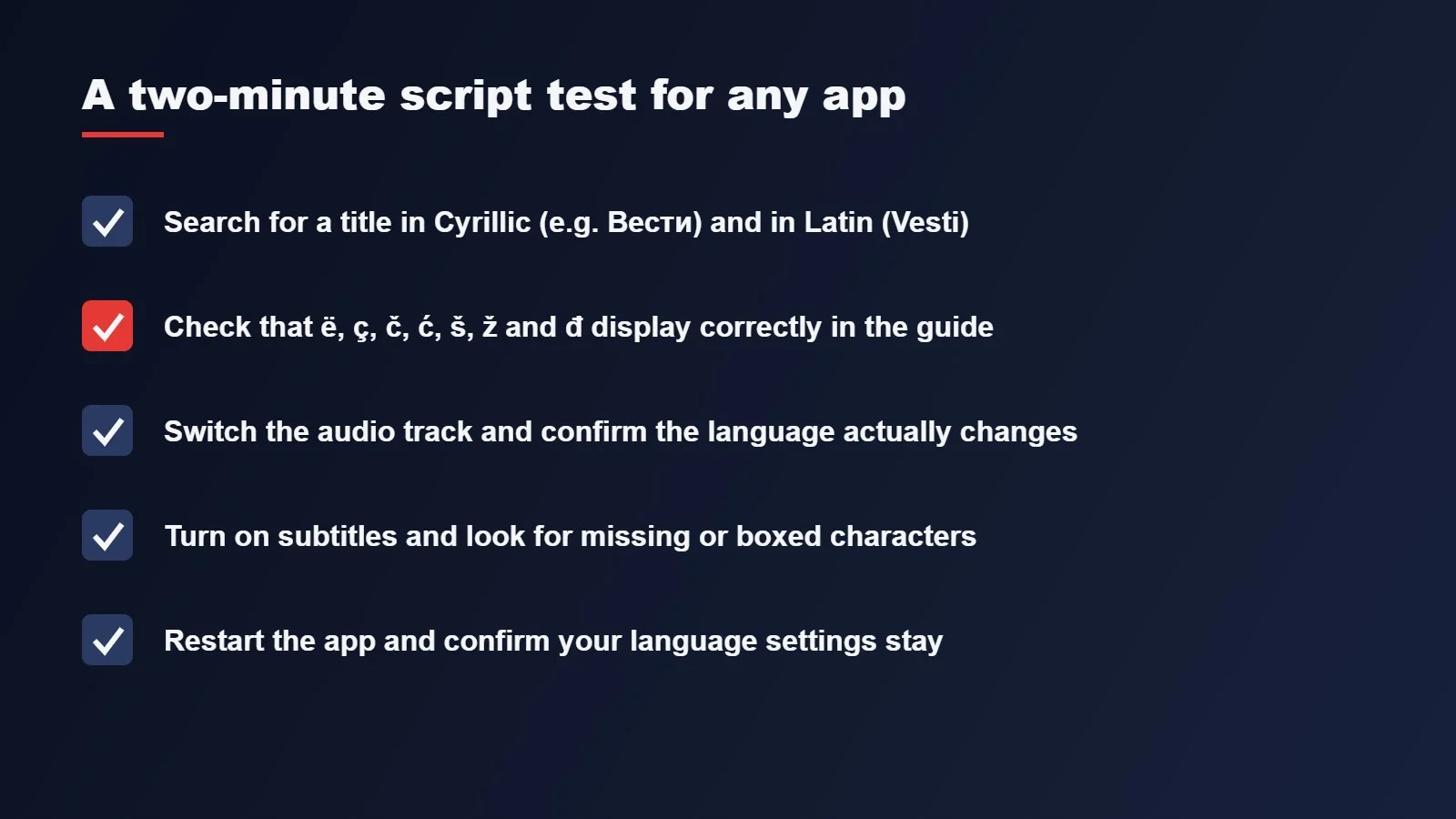
Program guides can fail in ways that are invisible in English-language demonstrations. Search for a program title in the intended alphabet, check whether diacritics appear, and confirm that sorting and favorites preserve the name after restarting the application. Serbian users may move between Latin and Cyrillic; Macedonian guides use Cyrillic; Albanian names require their own characters.
An app might display the live video correctly while making search unreliable because metadata is encoded badly. Capture the affected EPG entry and device/app version rather than sending customer credentials. Ask whether the player allows a different guide source or language preference and whether the service supports the fix. Avoid promising that every subscription provides all translation or subtitle options.
A device matrix prevents failed purchases
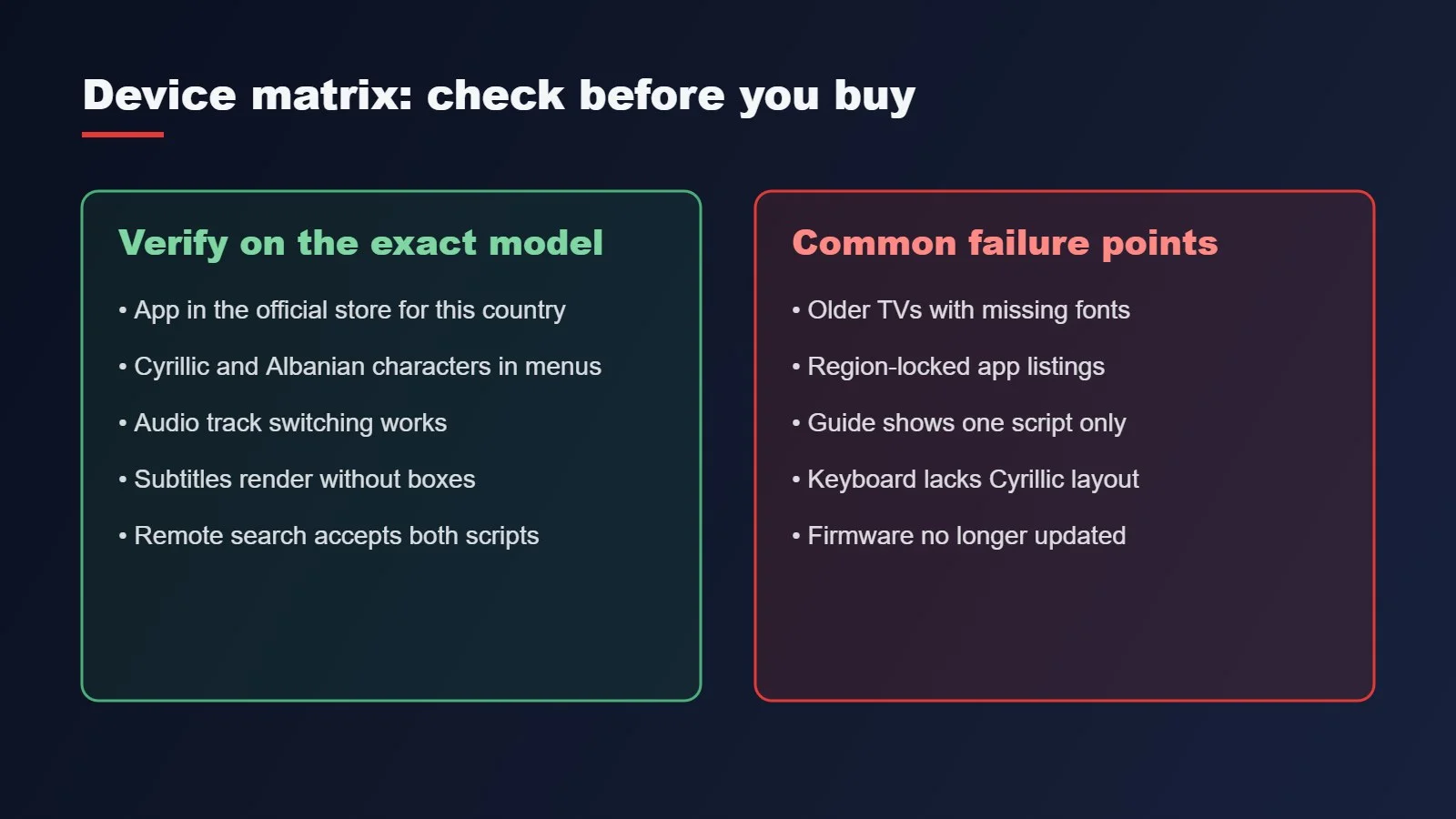
A licensed streaming service may work in a mobile browser but lack a native smart-TV app. Check official app-store listings for Android TV or Google TV, Apple TV, Fire TV, Samsung and LG as separate platforms. Compare remote-control focus, subtitle toggle, guide scrolling and accessibility features. If the player charges its own activation fee, include that cost and its renewal rules. When an app is missing in one national storefront, do not instruct readers to download anonymous installation files as the default workaround. Ask the rights holder or developer which platforms and countries are supported. Record the exact model and software version; ‘smart TV’ is not a sufficient compatibility specification.
Three official-style broadband tools, three different roles
For Serbia, RATEL NetTest offers a public broadband measurement route. For North Macedonia, the AEK NetTest tool helps users assess access quality. Kosovo’s regulator RAEPC/ARKEP provides information about communications services and authorizations, but that does not mean its portal certifies a specific streaming package. Use these references to distinguish telecom network evidence from audiovisual licensing. A regulator’s speed test can tell you about the connection to its measurement infrastructure; it does not reveal the legal status, physical location or future performance of a private media server. On the living-room device, record download consistency, delay variation and real playback behavior at the hours that matter.
Work through a multilingual home example
Imagine grandparents in Serbia who use Serbian Cyrillic and an adult child in Kosovo who prefers Albanian menus. They do not necessarily need the same account or even the same platform. Each side should select authorized content that matches its location, test language navigation and make sure the app is usable with its own remote.
When the family visits North Macedonia, the local rights and travel rules must be checked instead of assuming a cross-border entitlement. The key outcome is not a single commercial recommendation; it is a documented compatibility decision for each screen, language and territory. This protects family members from spending time on an app whose guide they cannot read or legally use.
Network problems that resemble language or subscription errors
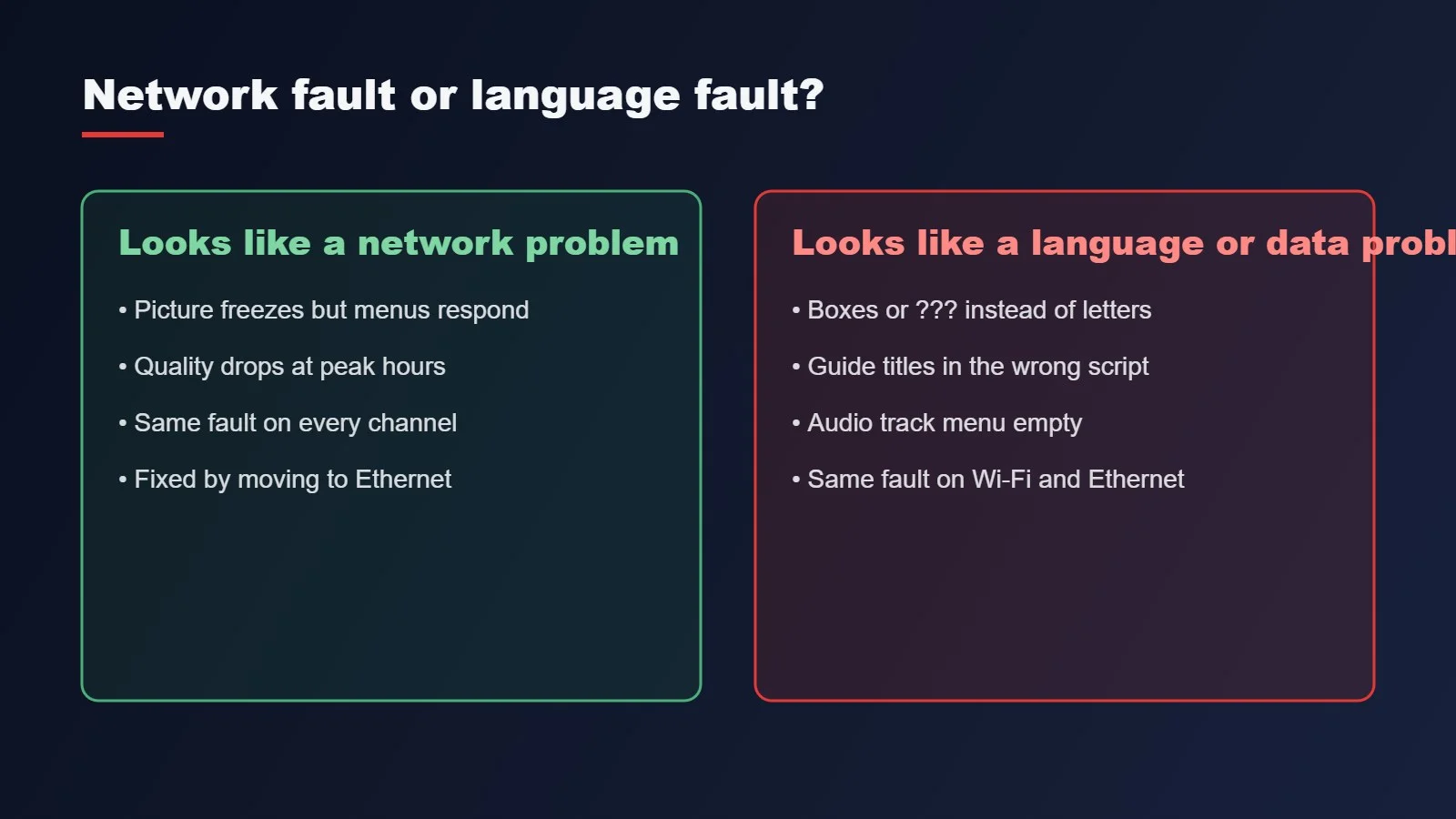
A frozen program logo might be a delivery failure, while a title in the wrong alphabet is a metadata problem. A login that works on one TV but not another may be an app-platform limitation or concurrent-device restriction. Start by categorizing the symptom instead of repeatedly clearing settings. Check the exact error message, restart the affected player once and compare another legitimate program. Then verify the account’s device allowance and the player’s EPG settings. Only after those checks run a local connection test or contact support. Describe one reproducible failure at a time. This sequence is especially useful where the same household switches scripts, countries or television platforms.
Compatibility comparison for IPTV in Kosovo, Serbia and North Macedonia
| Reader need | Kosovo | Serbia | North Macedonia |
|---|---|---|---|
| Language to test | Albanian or Serbian as needed | Serbian Latin/Cyrillic as needed | Macedonian/Albanian as needed |
| Regulator reference | RAEPC/ARKEP | RATEL | AEK |
| Priority | EPG language and app region | Script switching and search | Cyrillic guide and subtitles |
| Network verification | Actual home connection | RATEL NetTest | AEK NetTest |
| Rights check | Territory-specific provider terms | Territory-specific provider terms | Territory-specific provider terms |
Finish with evidence, not a three-country claim
Save a checklist for each household: supported player, subscription authorization, character handling, captions, local time, data use, concurrent connections and support language. Ask suppliers to answer these questions separately by country. There is no responsible basis for declaring a single provider the ‘best in all three’ without verified, current comparative testing and rights records. A careful compatibility guide should help a buyer identify which specific assumption failed and what to check next. Once the real setup works, document it for the other people who use that television so that upgrades and future login changes are easier.
A reproducible script test for an editorial reviewer
Set the player to its normal language and choose five representative program titles with actual Latin or Cyrillic characters. For each title, test search, favorite saving, guide display and subtitle rendering, then close and reopen the application. Record which feature passed rather than declaring the entire player compatible after a single successful search. Next, repeat the test on a second supported device only if the subscription allows it.
When an accent or Cyrillic character appears as a question mark, the problem may involve the guide feed or software font. Ask support about that specific symptom rather than changing network settings. The resulting checklist has practical value for Kosovo, Serbia and North Macedonia precisely because it documents different language workflows.
When two-country family plans are the wrong product
A family may prefer one account for convenience, but a provider’s terms may limit usage to one residence or territory. Paying for a second concurrent stream is not automatically permission to share across borders. Establish the allowed household, devices and content rights before sending login information to relatives. If the service has different catalogs for Serbia and Kosovo, ask how it determines residency and what happens during ordinary travel. Treat any uncertainty as a reason to use clearly authorized local subscriptions instead of improvising network workarounds. This protects consumers from later account suspension as well as from a confusing television setup.
Avoid the most common purchasing mistakes
Do not pay for a long term solely because the monthly equivalent looks cheap. Do not install a mysterious app because someone says official stores are too restrictive. Do not assume an advertised number of channels means those channels are licensed, accessible or consistently available. Do not use a speed test to infer video-server location, and do not give a stranger remote control of your computer to fix a television login. Instead, ask for written terms, test the actual device and preserve evidence of any promised features. A cautious first purchase can save time, money and security headaches.
Frequently asked questions
Can one streaming app support Serbian Latin and Cyrillic?
Some can, but do not assume it. Test search, guide characters and preferences on the exact app version and device, and confirm whether both scripts remain readable.
Does Kosovo have the same app catalog as Serbia?
Not necessarily. Operating-system stores, broadcaster rights and device compatibility can differ by location. Verify each official store and subscription territory independently.
What is the AEK NetTest used for?
North Macedonia’s AEK NetTest measures aspects of internet access quality. It is a network diagnostic resource, not a license for any private television service.
How do I test Macedonian subtitles?
Choose a program where the legitimate provider offers them, enable subtitles and check Cyrillic rendering and timing throughout a normal viewing session.
What if one person is in Prishtina and another in Belgrade?
Check whether the subscription permits two countries, households and simultaneous screens. If not, separate local authorized accounts may be required.
Is a working login proof of legal rights?
No. The ability to sign in or play a stream does not establish content authorization. Request the distributor’s current terms for each territory.
Related Plus TV reading
Official references and additional reading
- RAEPC/ARKEP: Kosovo electronic communications
- RATEL: Serbian internet test
- AEK: North Macedonia NetTest
The independent references above explain regulatory, technical or consumer issues. They do not endorse Plus TV or establish any particular content license. Product catalogs, app access and live-event rights should be checked again before any publication or purchase.
Related Articles
November 20, 2026
IPTV in the Balkans: A Regional Viewing Guide for Families and Diaspora
November 20, 2026
IPTV in Albania: Devices, Albanian Language and Setup Guide
November 20, 2026
IPTV Reseller Plans in Brazil: Credits, Costs and Support Explained

November 20, 2026