
🔥 FLEXIBLE & SECURE PAYMENTS — USDT • USDC • BTC • ETH • SOL • TRON (TRC20) • BINANCE PAY • KAST & MORE
What is IPTV?
 plustv
•
13 min read
What is IPTV? IPTV stands for Internet Protocol Television: television and video delivered as data over IP networks instead of through an antenna, a satellite dish, or a traditional cable signal. If you have ever watched a live channel inside an app or streamed a show to a smart TV, you have already used technology that works on the same principles.
This beginner guide answers the question “what is IPTV?” in plain language. It explains how IPTV works behind the scenes, how it compares with cable and satellite, what equipment you need, and how to tell a legitimate service from a risky one. No networking background is required.
Table of Contents
What is IPTV? A simple definition
The International Telecommunication Union, the UN agency that coordinates telecom standards, describes IPTV as multimedia services such as television, video, audio, text, and data delivered over IP-based networks that are managed for quality, security, interactivity, and reliability. You can read the ITU definition of IPTV on its website.
In everyday conversation the term is broader. When people ask what is IPTV, they usually mean one of two related things. The first is managed IPTV, run by a telephone or broadband company over its own network, usually with a set-top box. The second is internet streaming, often called OTT (over the top), which delivers live channels and on-demand video across the public internet to apps on almost any device.
Both use internet protocol to move video, which is why the labels blur. The practical difference is who controls the network between the source and your screen: the operator in the first case, and a mix of content delivery networks, your broadband provider, and your home Wi-Fi in the second.
How IPTV works, step by step
The answer to “what is IPTV?” becomes much clearer when you follow a single channel from its source to your TV. Whatever the service, the journey has five stages.
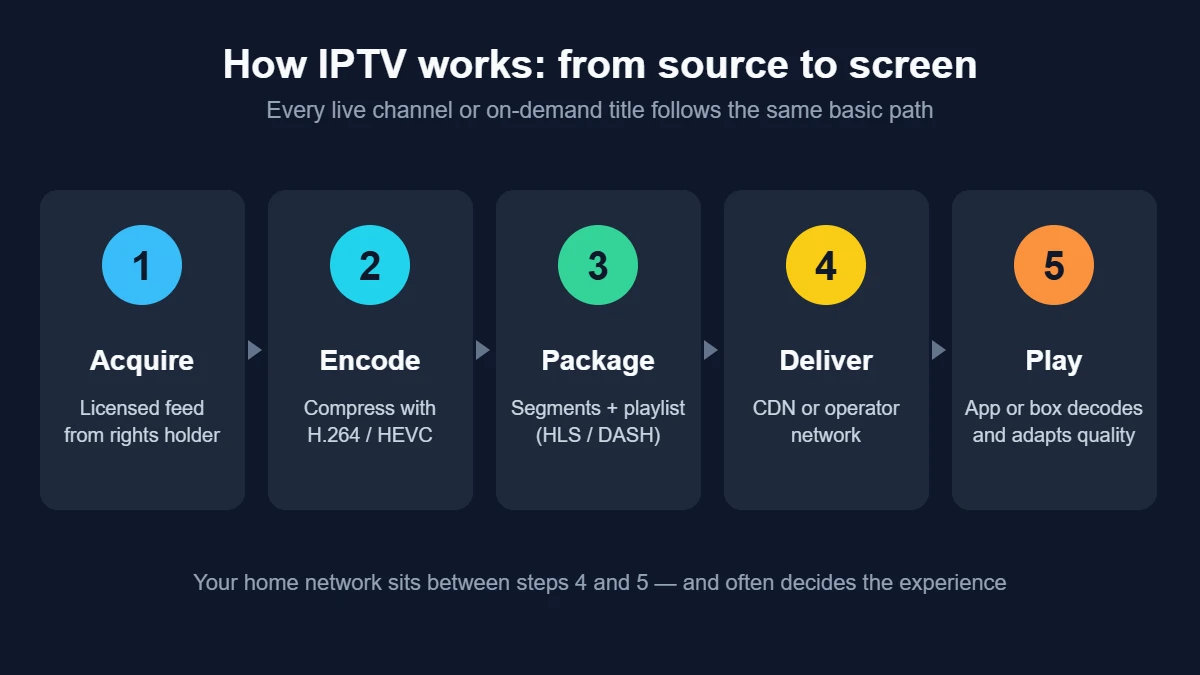
- Acquisition: the provider receives the channel or programme from the rights holder, usually as a high-quality feed.
- Encoding: the video is compressed with a codec such as H.264 (AVC) or H.265 (HEVC) so it can travel efficiently. Several versions at different bitrates are usually produced.
- Packaging: for internet delivery, the stream is cut into short segments and described in a playlist or manifest using formats such as HLS or MPEG-DASH. Managed networks often carry MPEG transport streams instead.
- Delivery: segments travel from origin servers through a content delivery network (CDN) or the operator’s own network to your home.
- Playback: an app or set-top box downloads the segments, decodes them, and displays them, switching quality up or down as conditions change.
That last step, called adaptive bitrate streaming, is why a picture can look soft for a few seconds at the start of a programme and then sharpen. Apple’s HTTP Live Streaming documentation explains how HLS adjusts playback to the speed available on wired and wireless connections.
Multicast vs. unicast: why live IPTV behaves differently
Managed IPTV networks often use multicast. The operator sends one copy of a live channel into its network, and each set-top box joins the group it wants, a little like tuning to a frequency. Because the operator controls the whole path, quality stays predictable even when many homes watch the same event.
Internet streaming normally uses unicast. Every viewer receives a separate copy over HTTP, usually from a nearby CDN server. This scales well and works on almost any device, but performance depends on your broadband line, your home Wi-Fi, and the route between you and the server. That is the main reason big live events on internet services can be more sensitive to congestion than a broadband operator’s own TV channels.
How to tell which kind of IPTV you have
Knowing what IPTV is in general is useful, but it also helps to know which version is running in your own living room, because the troubleshooting steps differ.
- You probably have managed IPTV if your TV service came from your broadband or phone company, arrived with its own set-top box plugged directly into the router, and keeps working even when other internet traffic in the house is heavy.
- You probably have internet streaming if you watch through an app on a smart TV, stick, phone, or computer, can sign in on different networks such as a friend’s Wi-Fi, and see quality change when your connection slows down.
With managed IPTV, the operator is responsible for most of the delivery path, so persistent faults are usually a call to its support team. With internet streaming, more of the path is in your hands: router placement, Wi-Fi band, cabling, and other devices competing for bandwidth all play a part. In both cases, writing down when a problem happens, on which channel or title, and on which device makes any support conversation far more productive.
Some homes use both at once, for example an operator box in the living room and streaming apps on a bedroom TV. That is perfectly normal; just remember that a fault on one does not necessarily mean a fault on the other.
The three types of IPTV content
Most IPTV services, managed or internet-based, offer some combination of three kinds of content:
- Live TV: linear channels shown as they are broadcast, usually with an electronic program guide (EPG).
- Video on demand (VOD): a library of films and episodes you can start at any time.
- Time-shifted TV: catch-up for programmes from previous days, start-over for shows already in progress, and network recordings stored in the cloud.

Which of these features you actually get depends on the rights a service holds for each channel or title, not on the technology itself. Two services built on identical platforms can offer very different catch-up windows or recording options.
IPTV vs. cable vs. satellite
Another way to answer what is IPTV is to compare it with the delivery methods most households already know. Each one reaches the same television in a different way, and each has its own weak point.
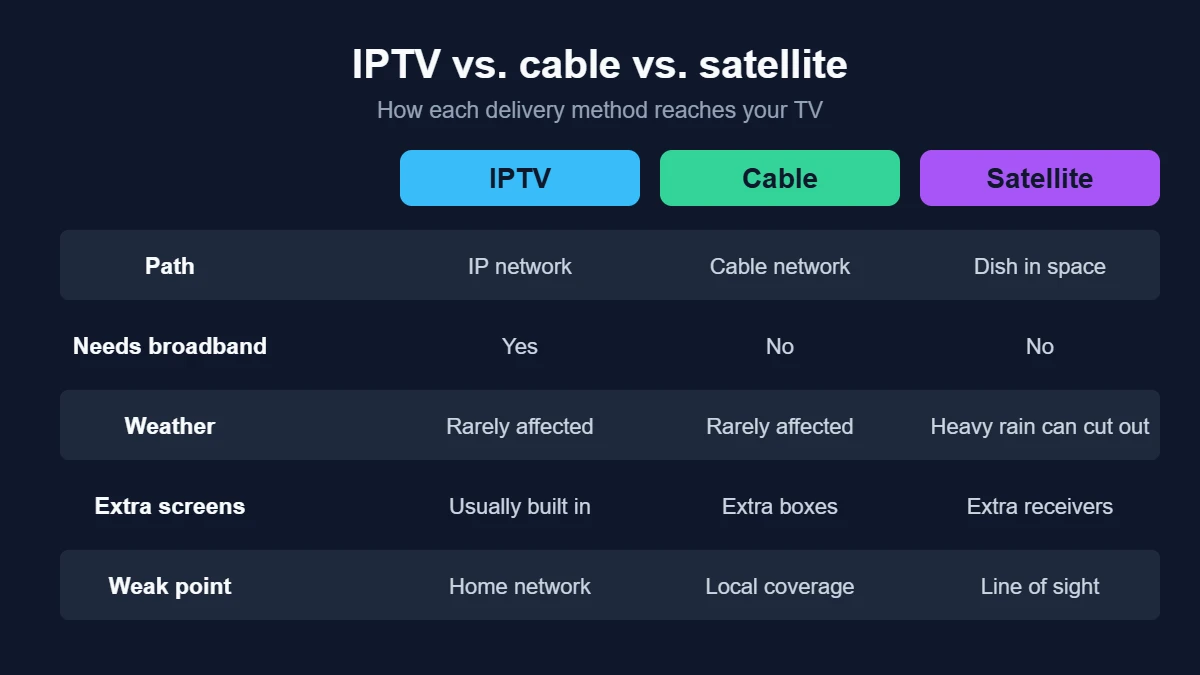
| IPTV | Cable | Satellite | |
|---|---|---|---|
| Delivery path | IP network (managed or public internet) | Coaxial or fiber cable network | Satellite signal to a dish |
| Typical equipment | App, smart TV, streaming stick or set-top box | Cable box or module | Dish, LNB and receiver |
| Needs broadband | Yes | No (for TV) | No |
| Weather sensitivity | Low | Low | Heavy rain or snow can interrupt |
| Watching on several screens | Usually built in | Often needs extra boxes | Often needs extra receivers |
| Main weak point | Home network and congestion | Regional availability | Line of sight and installation |
None of these is automatically better. IPTV wins on flexibility, device choice, and on-demand features, while cable and satellite are less affected by what happens inside your home network.
What you need to watch IPTV
Once you know what IPTV is, the equipment list is short:
- A compatible device: a smart TV with the service’s app, a streaming stick, a set-top box, a phone, a tablet, or a computer.
- A stable internet connection: as a reference point, Netflix publishes recommended internet speeds of about 5 Mbps for 1080p and 15 Mbps for 4K per stream. Check the figures your own service recommends.
- The official app or player for the service, installed from your device’s app store.
- An account with a provider that holds the rights for the channels and titles it offers.
Stability matters more than headline speed. A connection that delivers a steady 20 Mbps often streams better than one that bursts to 200 Mbps but drops packets over weak Wi-Fi. If you see frequent pauses, our guide to fixing streaming buffering walks through the checks in order.
A brief history of IPTV
IPTV is older than most people expect. The name first appeared in the mid-1990s, when a company called Precept Software released an internet video product named IP/TV, later acquired by Cisco. At that time, home connections were far too slow for full television, so the idea stayed largely experimental.
Two developments changed that: better video compression and faster broadband over existing telephone lines. By the late 1990s and early 2000s, telecom operators in the UK, Canada, the United States, and elsewhere were launching television services over DSL. Through the following decade, many broadband providers around the world added IPTV packages alongside internet and phone plans.
The next shift came with smartphones, smart TVs, and streaming sticks. Instead of relying on an operator’s private network, broadcasters and platforms began delivering live channels and on-demand libraries over the open internet. Today, when someone asks what is IPTV, they are often describing this app-based model, even though the managed operator version is still widely used.
Watching IPTV on different devices
Because IPTV is just data, the same service can usually follow you from room to room. The experience still varies by device:
- Smart TVs: convenient because there is no extra box, but app support depends on the TV’s operating system and how long the manufacturer keeps releasing updates.
- Streaming sticks and boxes: often the easiest upgrade for an older TV. They receive app updates more regularly and usually include Ethernet adapters or better Wi-Fi.
- Operator set-top boxes: designed for one provider’s managed service, typically with recording features and a familiar remote control.
- Phones, tablets, and computers: ideal for watching on the move or in another room, though mobile data limits and screen size affect the experience.
Whatever you use, keep the device and its apps updated, install apps only from official stores, and use a strong, unique password for each streaming account. Those three habits prevent many security and compatibility problems.
Common IPTV terms explained
Any complete answer to what is IPTV includes a little jargon. Here is what the most common terms mean:
- M3U playlist: a text file that lists stream addresses, used by some media players to organize channels.
- EPG / XMLTV: program guide data that tells the app what is on each channel and when.
- HLS and MPEG-DASH: the two most common adaptive streaming formats on the internet.
- Codec: the compression method used for video, such as H.264, HEVC, or AV1.
- Bitrate: the amount of data per second; higher bitrates usually mean more detail.
- Latency: the delay between something happening live and appearing on your screen.
- CDN: a network of servers that stores copies of streams close to viewers to reduce delay and congestion.
Is IPTV legal?
A common follow-up to what is IPTV is whether it is legal. IPTV as a technology is completely legal. Public broadcasters, telecom operators, and major streaming platforms all deliver television over IP every day. What matters is whether a specific service has permission from the rights holders to distribute the channels, films, and events it offers.
Unlicensed services are a real and well-documented problem. A study commissioned by the EU Intellectual Property Office estimated that unauthorized IPTV services in the EU earned roughly €941.7 million in 2018 and reached about 13.7 million users. The full Illegal IPTV in the European Union report describes how these services operate. Rules differ by country, and selling or knowingly using unlicensed streams can carry legal risk.
Before paying for any service, it is reasonable to look for the following signs:
- A clearly identified company with contact details, terms of service, and a privacy policy.
- A channel line-up that matches what licensed broadcasters offer in your country.
- Official apps available in mainstream app stores rather than files you must install manually.
- Transparent pricing, renewal rules, and a refund policy.
- No request to install modified apps or switch off your device’s security protections.
Common IPTV problems and how to approach them
Understanding what IPTV is also helps you diagnose problems, because most of them trace back to one stage of the delivery chain.
- Buffering or freezing: usually the home network, Wi-Fi interference, or congestion between you and the server. Test with an Ethernet cable before changing anything else.
- Soft or blocky picture: often a low bitrate from the source or the app’s quality setting, sometimes made worse by aggressive TV sharpening.
- Audio out of sync: frequently an app or device setting; restarting the stream or checking audio output modes usually helps.
- Delay compared with broadcast TV: encoding, segmenting, and buffering all add a few seconds. Low-latency streaming formats reduce this gap but rarely remove it completely.
For the network side, the step-by-step checks in our streaming buffering guide are a good place to start.
What is IPTV? Frequently asked questions
What does IPTV stand for?
IPTV stands for Internet Protocol Television. It means television and video delivered as data over IP networks rather than through antenna, cable, or satellite signals.
Is IPTV the same as streaming?
They are closely related. Managed IPTV runs over a broadband operator’s controlled network, while internet streaming (OTT) travels across the public internet. Both use internet protocol to deliver video.
Do I need a special box for IPTV?
Not always. Many services offer apps for smart TVs, streaming sticks, phones, and computers. Broadband operators that run managed IPTV usually supply their own set-top box.
How much internet speed does IPTV need?
It depends on picture quality. As a reference, Netflix recommends about 5 Mbps for 1080p and 15 Mbps for 4K per stream. A stable connection matters as much as raw speed.
Is IPTV legal?
The technology is legal and widely used by broadcasters and telecom companies. Whether a particular service is legal depends on whether it is licensed to distribute the content it offers.
Why does live IPTV lag behind broadcast TV?
Encoding, packaging into segments, and buffering on your device all add delay. Low-latency formats shorten the gap but usually do not eliminate it.
Summary
So, what is IPTV? It is television delivered as data over IP networks, either as a managed service from a broadband operator or as an internet streaming service you watch in an app. It offers flexibility across devices and features such as catch-up and on-demand viewing. Its quality depends largely on your connection, and its legitimacy depends on the rights the provider holds. Keeping both in mind will help you get the most from any service you choose.
Related Articles
November 20, 2026
IPTV in Kosovo, Serbia and North Macedonia: Language and Device Compatibility Guide
November 20, 2026
IPTV in the Balkans: A Regional Viewing Guide for Families and Diaspora
November 20, 2026
IPTV in Albania: Devices, Albanian Language and Setup Guide

November 20, 2026