
🔥 FLEXIBLE & SECURE PAYMENTS — USDT • USDC • BTC • ETH • SOL • TRON (TRC20) • BINANCE PAY • KAST & MORE
Streaming Data Usage: How Much Data HD and 4K Really Use
Streaming data usage explained: how much data HD and 4K use per hour, how to estimate a monthly budget, and settings that cut usage on a data cap.
 plustv
•
9 min read
Streaming data usage depends far more on the quality setting than on the speed of your internet plan. One hour of HD video on Netflix can use up to 3 GB, while the same hour in 4K can reach 7 GB. If you have a monthly data cap, a mobile hotspot, or a busy household, knowing those numbers lets you choose where 4K is worth it and where HD is plenty.
This guide explains how much data streaming really uses, how to estimate your own monthly total, and which settings actually reduce it. Figures come from the services’ own help pages wherever possible.
Table of Contents
How much data does streaming use per hour?
Netflix publishes the clearest official figures. Its data usage settings page lists usage per device, per hour, for each quality level. Disney+ says in its help centre that 4K streaming can use about 7.7 GB per viewing hour. Other services fall in a similar range, but always check the provider you use most.
| Quality setting | Typical use | Data per hour (up to) |
|---|---|---|
| Low (basic quality) | Phones on mobile data | 0.3 GB |
| Medium (standard) | Small screens, tight caps | 0.7 GB |
| High: SD | Older TVs, slow connections | 1 GB |
| High: HD (720p/1080p) | Most TVs and laptops | 3 GB |
| High: 4K Ultra HD | 4K TVs with a 4K plan | 7 GB |
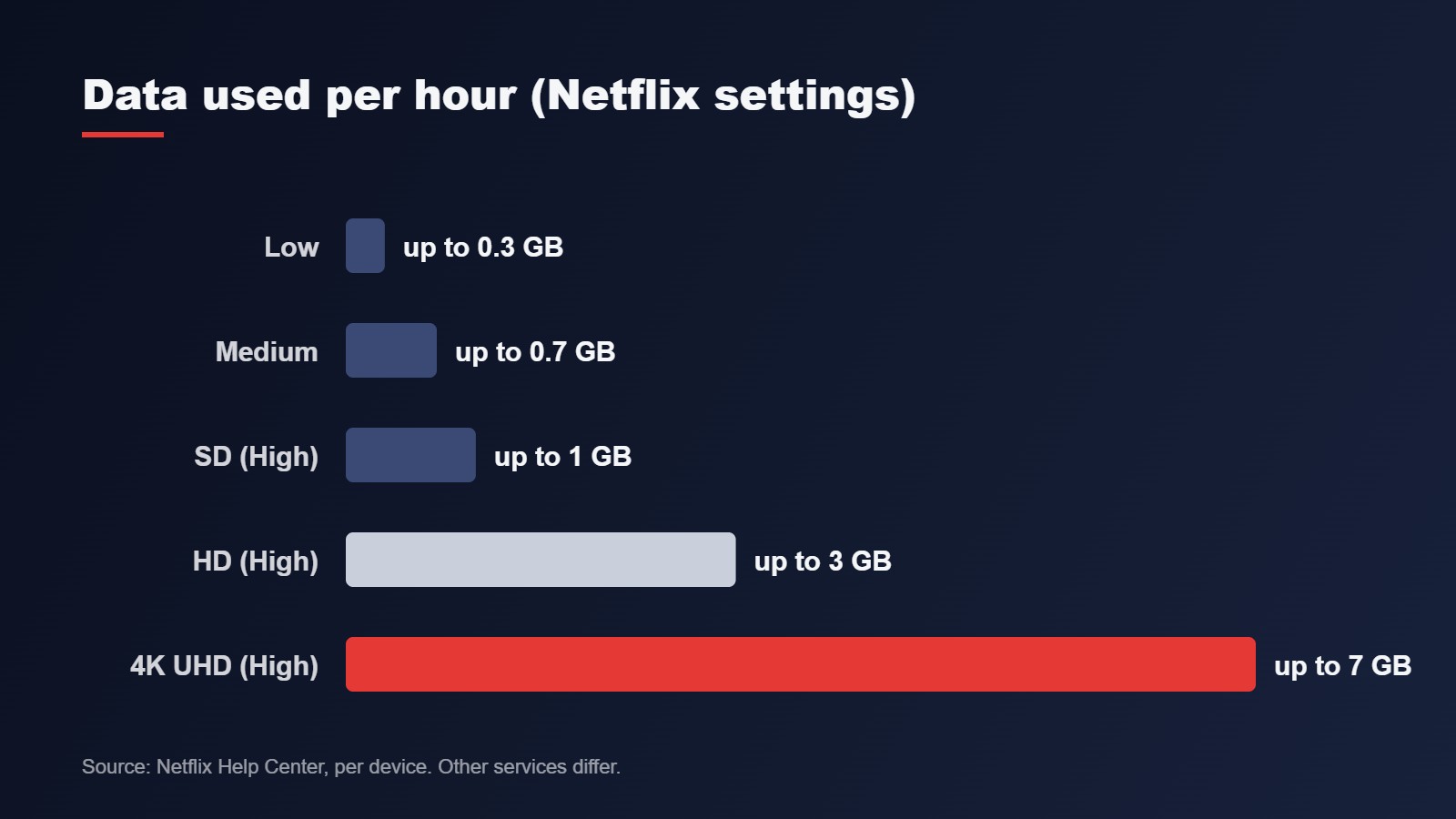
The headline takeaway: 4K uses roughly two to three times as much data as HD on Netflix, not four times, even though it has four times as many pixels. Modern codecs compress 4K efficiently, but the extra detail still adds up over a month.
Speed and streaming data usage are not the same thing
Internet speed is a rate, measured in megabits per second (Mbps). A data allowance is a total, measured in gigabytes (GB) per month. A faster connection does not use more data by itself: the app picks a stream quality, and that quality determines how many gigabytes you download.
Netflix recommends a stable connection of at least 3 Mbps for 720p, 5 Mbps for 1080p and 15 Mbps for 4K. Those are minimums for smooth playback, not hourly data figures. A 15 Mbps recommendation does not mean 15 GB per hour.
How to estimate streaming data usage from bitrate
If you know a stream’s average bitrate, you can work out its data use with one line of arithmetic: multiply the bitrate in Mbps by the number of hours, then by 0.45, to get gigabytes. The 0.45 comes from 3,600 seconds per hour divided by 8 bits per byte and 1,000 megabytes per gigabyte.
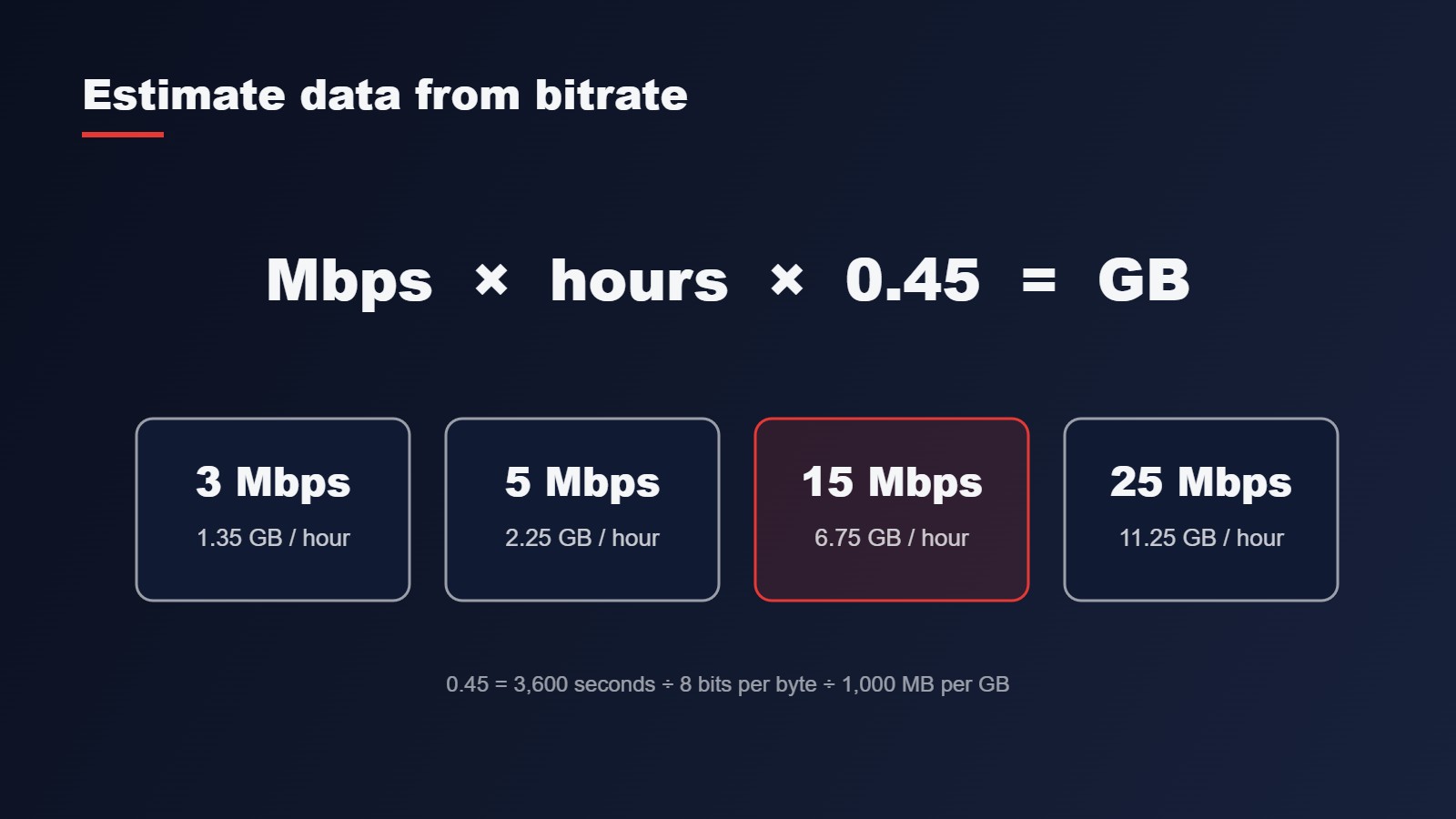
For example, a 5 Mbps stream for two hours is 5 × 2 × 0.45 = 4.5 GB. Use the average bitrate shown in a player’s statistics screen when one is available, rather than the maximum a service advertises, because adaptive streaming varies the bitrate throughout a programme.
What HD and 4K labels really mean
“HD” can mean 720p or 1080p depending on the service and your plan. “4K” or “Ultra HD” usually means 3840 × 2160, but you only receive a 4K stream when the title, your subscription, your device and your connection all support it.
A 4K TV also upscales lower-resolution video to fill the screen. That does not mean the stream was delivered in 4K or used 4K-level data. Check the app’s playback information, where available, rather than the TV’s output resolution. If picture quality matters to you, our guide to improving streaming picture quality covers the settings that make the biggest visible difference.
Is 4K streaming worth it on a data cap?
It depends on the screen and the cap. On a 55-inch or larger 4K TV viewed from a normal sofa distance, 4K streaming with HDR can look noticeably sharper and richer, especially in nature documentaries and big films. On a 43-inch set across the room, many people struggle to tell 4K from good 1080p.
A sensible compromise on a data cap is to reserve 4K streaming for the titles you actually sit down to watch, and leave background viewing, kids’ shows and news in HD. That way the extra streaming data usage goes where you can see the benefit.
If your plan has no cap, the only real limits are your connection speed and your subscription tier.
Build a monthly streaming data budget
A realistic budget uses a range rather than one precise number, because adaptive streams rarely hit their maximum all the time. Start with the worst case, then compare it with your actual usage after a month.
- List each person’s typical viewing hours on weekdays and weekends.
- Note the quality each device usually plays at: phone, laptop, HD TV or 4K TV.
- Multiply hours by the per-hour figure for that quality.
- Add live sports or film nights, which tend to be longer and higher quality.
- Leave headroom for software updates, game downloads, cloud backups and video calls.
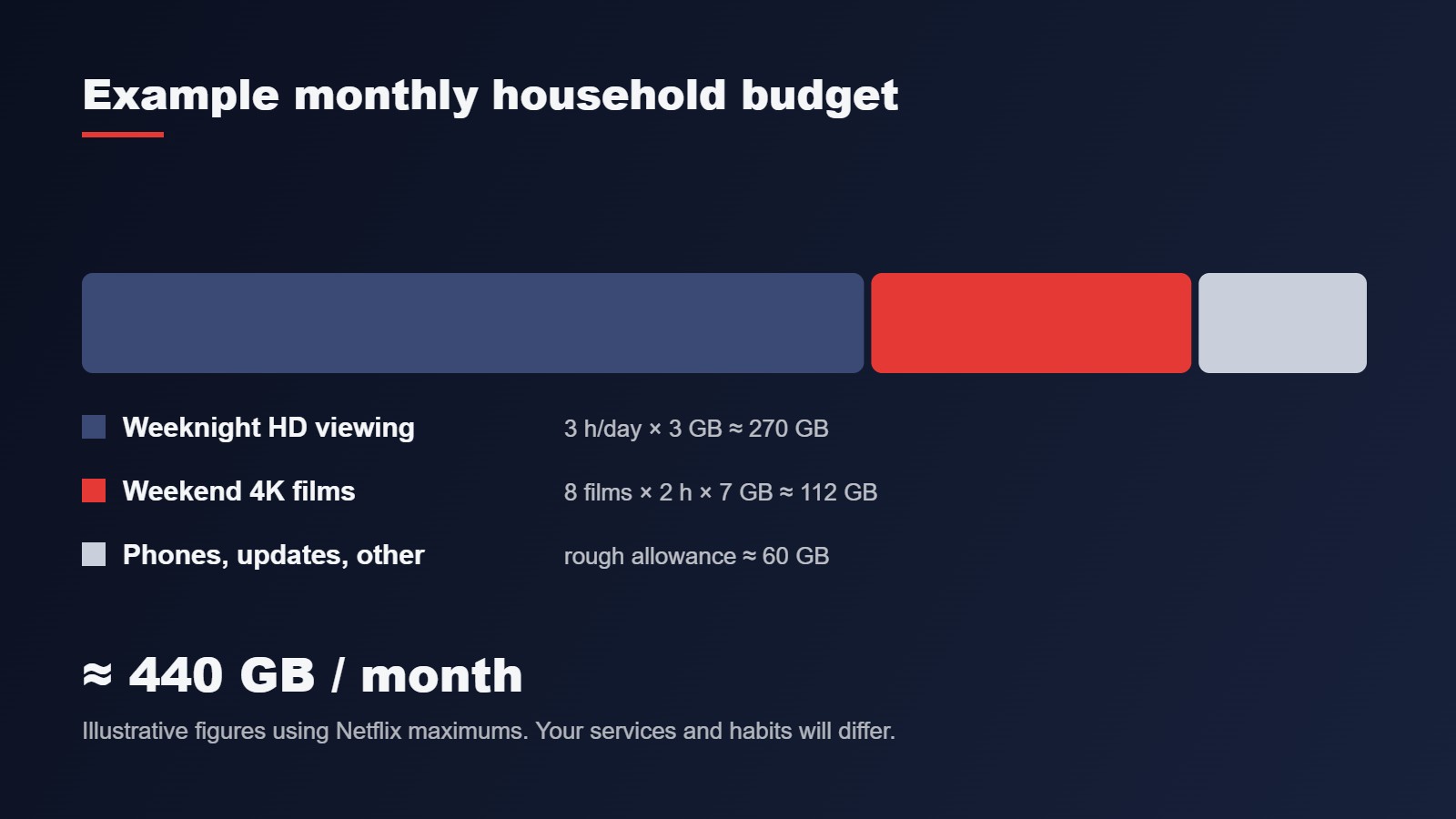
In the example above, three hours of HD each evening adds up to about 270 GB in a 30-day month, and eight weekend 4K films add roughly 112 GB more. If your plan has a 500 GB cap, that leaves a modest margin. If it has a 250 GB cap, HD-only viewing on weeknights is already close to the limit.
Settings that reduce streaming data usage
Most of the savings in streaming data usage come from inside the streaming apps, not the TV. Look for a playback quality, data usage or data saver option in each app’s settings or account page.
- Netflix: choose Low, Medium, High or Auto data usage for each profile in your account’s playback settings, and pick a mobile data option in the phone app.
- Disney+: data usage settings apply per device, so change them on each TV, phone or streaming stick you use.
- Autoplay: turn off autoplay of next episodes and previews, which quietly adds viewing hours.
- Screen size: drop phones and tablets to standard quality first. The difference is hard to see on a small screen.
- 4K where it counts: keep 4K for the main TV and for films you care about, and use HD elsewhere.
Watching on a mobile hotspot or while travelling
Hotspot viewing draws on your phone plan, whose data cap is often far smaller than a home broadband allowance. Before a trip, check the plan’s cap, any speed reduction after a threshold, and roaming rules. A TV or streaming stick connected to a hotspot may also download app and system updates in the background, adding to your streaming data usage without you noticing.
Where a service offers official downloads, save episodes over unlimited Wi-Fi before you leave. Downloads still take storage and may expire under licensing rules, but watching them offline uses no mobile data.
Measure your actual usage
Estimates are a starting point; your provider’s meter is the final word on streaming data usage. To check a single service, note your router or ISP counter, watch one programme at a known quality with nothing else running, then note the counter again. Repeat at a different quality setting to see the real difference on your connection.
If your monthly total is higher than expected, look beyond streaming: automatic game downloads, phone backups, smart cameras and system updates are common culprits. If you are seeing buffering rather than overspending, our guide to fixing streaming buffering explains the network side, and reducing buffering during live sports covers big live events.
Quick checklist for managing streaming data usage
- Find your plan’s monthly cap and what happens when you exceed it.
- Use per-hour figures (about 3 GB for HD and 7 GB for 4K on Netflix) for a worst-case estimate.
- Set data usage per profile or per device in each streaming app.
- Turn off autoplay and keep phones on standard quality.
- Download episodes over Wi-Fi before travelling.
- Compare your estimate with the ISP meter after one month and adjust.
Frequently asked questions
Does 4K use four times as much data as HD?
No. 4K has four times the pixels of 1080p, but compression narrows the gap. Netflix lists up to 3 GB per hour for HD and up to 7 GB for 4K, so roughly two to two and a half times as much.
Is 15 Mbps the same as 15 GB per hour?
No. Mbps is a speed. A stream running at a steady 15 Mbps would use about 6.75 GB per hour (15 × 0.45).
How much data does a two-hour movie use?
On Netflix, up to about 6 GB in HD and up to about 14 GB in 4K, based on its per-hour figures. Shorter scenes with little motion often use less.
Do subtitles or audio use much data?
Text subtitles are tiny compared with video. Surround sound tracks add a little, but video quality is by far the biggest factor.
Does pausing stop data use?
Mostly. Playback stops downloading new video shortly after you pause, although the app may already have buffered the next few seconds or minutes.
Sources
- Netflix Help Center: How to control how much data Netflix uses
- Netflix Help Center: Recommended internet speeds
- Disney+ Help Center: Managing data usage
Streaming services update their quality tiers and settings over time. Check each provider’s current help page before relying on exact figures.
Related Articles

November 20, 2026
IPTV in Kosovo, Serbia and North Macedonia: Language and Device Compatibility Guide

November 20, 2026
IPTV in the Balkans: A Regional Viewing Guide for Families and Diaspora

November 20, 2026
IPTV in Albania: Devices, Albanian Language and Setup Guide

November 20, 2026